


Features
Xero Integration for Farm Financial Management
If your farm bookkeeping runs through Xero, P2PAgri connects directly to it. Your accounting data flows into P2PAgri's farm business analysis without any double entry, and the monthly cash flow import now builds the cash flow lines it needs as it goes. Connect once, import as often as you need.
How Do I Connect Xero to My Farm Management Software?
If you're already using Xero for your farm accounting, P2PAgri can pull your Trial Balance and monthly cash flow figures directly with a one-click connection. Your financial data flows into P2PAgri automatically, building management reports, performance trends and analytics that Xero alone can't provide.
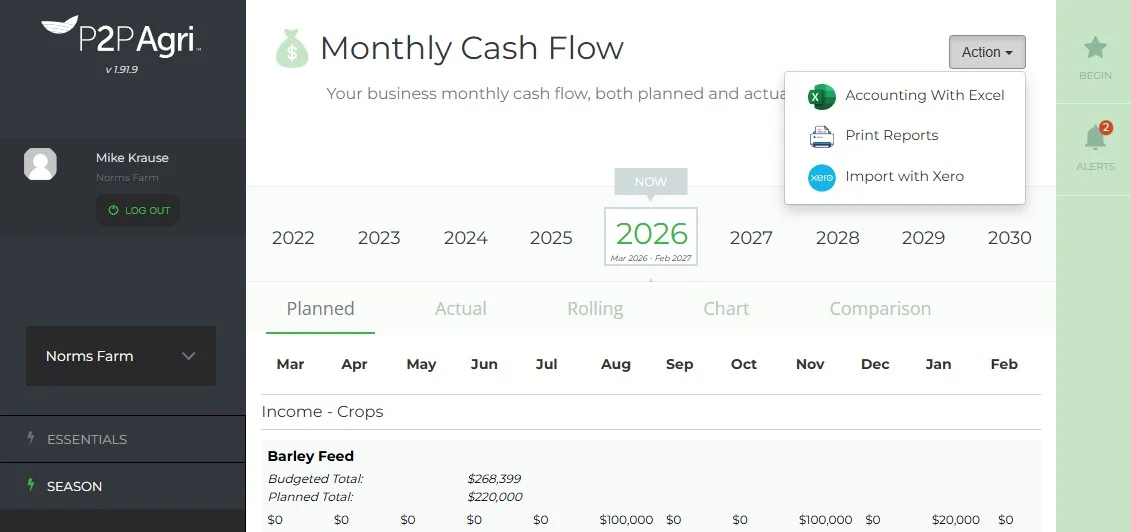
How It Works
Four steps, and only the first is a one-off.
- Connect your Xero organisation with Xero's secure sign-in. P2PAgri never sees your Xero password.
- Open the cash flow, pick the month and run the import from the Action menu. P2PAgri pulls that month's figures for every account in your chart of accounts.
- Check the matches. Each Xero account is matched to a line in your cash flow. If a line doesn't exist yet, the import offers to create it.
- Save. The figures land in the month, any new items are created in the same pass, and next month's import recognises them.
The Import Builds Your Cash Flow
Until recently the Xero import could only put figures against cash flow items you had already set up. A new account in Xero meant leaving the screen, creating the item by hand and importing again. Now the Matched Item list offers to create the item for you, suggests the right section from the account's type in Xero, and tells you the name it will be created under. An item that already exists under the same name is reused rather than duplicated.
Before you save, the screen says exactly what will happen: how many items will be created, how many updated, and how many Xero accounts are still unmatched. The Xero totals block splits each total into what you have matched and what is still to match, so you can see at a glance whether the month is complete.
Crop and livestock sales are deliberately left alone. That income belongs to your season plan, where it drives your gross margins, so the import points you to the SEASON screens instead of creating a second income line.
- Missing cash flow items created during the import, in the section that fits
- A plain summary of what Save will do before you commit
- Searchable matching lists, because a real chart of accounts runs past a hundred accounts
- GST inclusive or exclusive, chosen with a single switch
What Syncs From Xero
Your trial balance for balance sheet and profit and loss analysis in ESSENTIALS, your monthly figures for the actual cash flow, and your full chart of accounts for mapping and category assignment. Import monthly after your bookkeeper has closed the month, or whenever you want the picture brought up to date.
Account Code Mapping
P2PAgri's mapping screen lets you assign each Xero account to the right category: farm income, farm expenses, off-farm income, off-farm expenses, capital items and GST. Need to split a single Xero account across two categories? Use the split item feature. Do the mapping once and later imports take seconds.
AI-Powered Category Suggestions
Not sure which category a Xero account belongs to? P2PAgri's AI assistant can suggest the most appropriate category based on the account name and type, which speeds up the initial setup considerably.
Secure, Read-Only Connection
P2PAgri uses Xero's official OAuth2 authentication. Your Xero username and password are never shared with P2PAgri, and you can disconnect at any time from either P2PAgri or your Xero account settings. P2PAgri only reads from Xero. Nothing is written back, so your accountant's tax work is untouched and your management figures live in P2PAgri.
For Accountants and Advisers
If you're an accountant or adviser managing farm clients, the Xero integration means your client's P2PAgri data stays in sync with the books you manage. When a client's chart of accounts changes, the next import picks the new accounts up and offers to create the matching cash flow lines, so there is no re-setup on your side and no chasing spreadsheets.
Get Started
Xero integration is available on the Seasonal and Future plans. The free Essentials plan also includes basic Xero connection for balance sheet and P&L data.
FAQ
Frequently Asked Questions
No. P2PAgri only reads data from Xero. It never modifies, creates or deletes anything in your Xero account. Your accounting data is always safe.
The next cash flow import lists it, suggests the cash flow section based on its type in Xero, and creates the matching item when you save. Later imports recognise it automatically. An item that already exists under the same name is reused rather than duplicated.
Yes. Beside the Save button the screen says how many items will be created, how many updated, and how many Xero accounts are still unmatched. The Xero totals also show how much of each total you have matched so far.
Because that income belongs to your season plan, where it drives your crop and livestock gross margins. Enter the sales under SEASON and they flow into the cash flow from there. The import row tells you this rather than creating a duplicate income line.
As often as you like. Most users import monthly after their bookkeeper has processed the month's transactions, but you can import at any time.
You can disconnect your existing Xero connection and connect to a new Xero organisation at any time. Your P2PAgri data is retained. You'll just need to re-map the account codes for the new organisation, and the import will offer to create any cash flow items that are missing.
No. Xero is optional. If you use MYOB, Agrimaster, Phoenix or another package, export your Profit and Loss and Balance Sheet to Excel and upload those instead, or enter your figures manually.
Related Reading
Articles You Might Find Useful
Explore More
Key Capabilities for Your Farm Business
Import Your Farm Accounting Data from Any Software
Accounting Data Import
You don't need to switch accounting software to use P2PAgri. Connect Xero directly, or export your Profit and Loss and B...
Learn moreFarm Financial Planning & Cash Flow
Cash Flow Planning
Cash flow is the lifeblood of every farm business. A bumper harvest means nothing if you can't meet your repayments in J...
Learn moreGet More Insight from Your Farm Business Data
AI Assistant
P2PAgri includes a built-in AI assistant that understands farm finance. Ask questions in plain English, get help sorting...
Learn moreWork Seamlessly with Your Farm Business Accountant, Banker & Adviser
Adviser & Accountant Collaboration
Your farm adviser and accountant are more effective when they can see your numbers. P2PAgri lets you share your business...
Learn more