
Features
Import Your Farm Accounting Data from Xero, MYOB or Excel
You don't need to switch accounting software to use P2PAgri. Connect Xero directly, or export your Profit and Loss and Balance Sheet to Excel from whatever your bookkeeper or accountant uses. Bring your financial history into P2PAgri and start analysing your farm business immediately.
Can I Import My Farm Accounting Data from Any Software?
Yes. P2PAgri connects directly to Xero. For every other package, including MYOB, Agrimaster and Phoenix, you export your Profit and Loss and Balance Sheet to Excel and upload those two reports. Either way you can start getting management reports and performance analysis from day one, without re-entering years of data.
Supported Formats
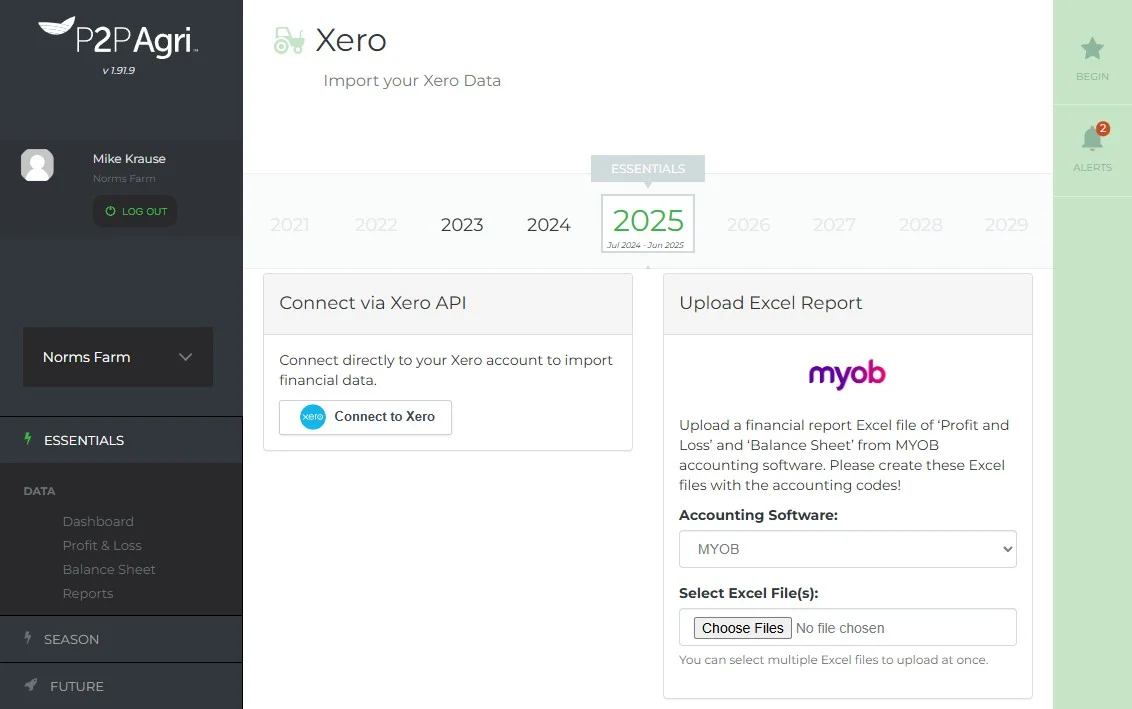
P2PAgri connects to Xero through the Xero API. For everything else you upload two Excel reports, a Profit and Loss and a Balance Sheet, exported with your accounting codes included. That works from MYOB, Agrimaster, Phoenix, or any package that can export to Excel or CSV, and P2PAgri detects the format when you upload it.
How It Works
Export from your accounting software, drag and drop the file into P2PAgri (format detected automatically), map your accounts to P2PAgri categories (AI suggests categories), and import. Your data populates your balance sheet, P&L, and cash flow.
Switching from Agrimaster or Phoenix?
You do not need a direct connector to bring your history across. Export your Profit and Loss and Balance Sheet from Agrimaster, Phoenix or whichever package you use, save them as Excel files with your accounting codes included, then upload both. Your figures populate your balance sheet, P&L and cash flow, and your existing cashbook stays exactly where it is.
Works Alongside Your Accountant
P2PAgri doesn't replace your accounting software or your accountant. It takes the financial data they produce and adds farm-specific analysis on top: enterprise gross margins, cash flow forecasting, scenario planning, and more.
Import for the Free Essentials Plan
Even on the free Essentials plan, you can import your tax return data (balance sheet and P&L) to see your farm's financial position. It's the simplest way to get started with P2PAgri.
Get Started
Basic import (for balance sheet and P&L) is available on the free Essentials plan. Full import with cash flow population is available on the Seasonal plan.
FAQ
Frequently Asked Questions
Absolutely. Export your Profit and Loss and Balance Sheet from MYOB to Excel with your account codes included, then upload both on the ESSENTIALS Import screen, where the MYOB upload sits beside the Xero connection. P2PAgri matches your accounts and sorts your expenses into cost types, and a MYOB upload reuses the cost splits you saved last year. Your MYOB data powers P2PAgri's farm-specific analysis without changing your bookkeeping workflow.
Yes. Import data for as many years as you have available. Historical data enables year-on-year comparisons, trend analysis, and more powerful reporting.
P2PAgri can extract financial data from PDF balance sheets and trial balances. Upload the PDF and the system will parse the numbers, so you don't need to retype them manually.
No. Imports are matched to specific reporting periods. You control which data is imported and where it goes. Existing data in other periods is not affected.
Explore More
Key Capabilities for Your Farm Business
Import Your Farm Accounting Data from Any Software
Xero Integration
If your farm bookkeeping runs through Xero, P2PAgri connects directly to it. Your accounting data flows into P2PAgri's f...
Learn moreFarm Financial Planning & Cash Flow
Cash Flow Planning
Cash flow is the lifeblood of every farm business. A bumper harvest means nothing if you can't meet your repayments in J...
Learn moreFarm Financial Planning & Cash Flow
Financial Reports & Bank Ratios
Whether your bank asks for financials, your adviser needs a summary, or you just want to see how the year stacked up, P2...
Learn moreGet More Insight from Your Farm Business Data
AI Assistant
P2PAgri includes a built-in AI assistant that understands farm finance. Ask questions in plain English, get help sorting...
Learn more