

Features
Farm Cash Flow Budgeting Software
Cash flow is the lifeblood of every farm business. A bumper harvest means nothing if you can't meet your repayments in June. P2PAgri lets you plan the year month by month, pull your actual figures straight from Xero, and see exactly where your money is coming from, where it's going, and whether you'll have enough when it matters.
How Do I Manage Cash Flow on My Farm?
Income on most Australian farms lands in a few months of the year. Expenses do not. Fertiliser, chemicals, contractors, repayments and living costs keep going out whether the grain cheque has arrived or not, so the question is never just whether the year will be profitable. It is whether there will be money in the account in the month it is needed.
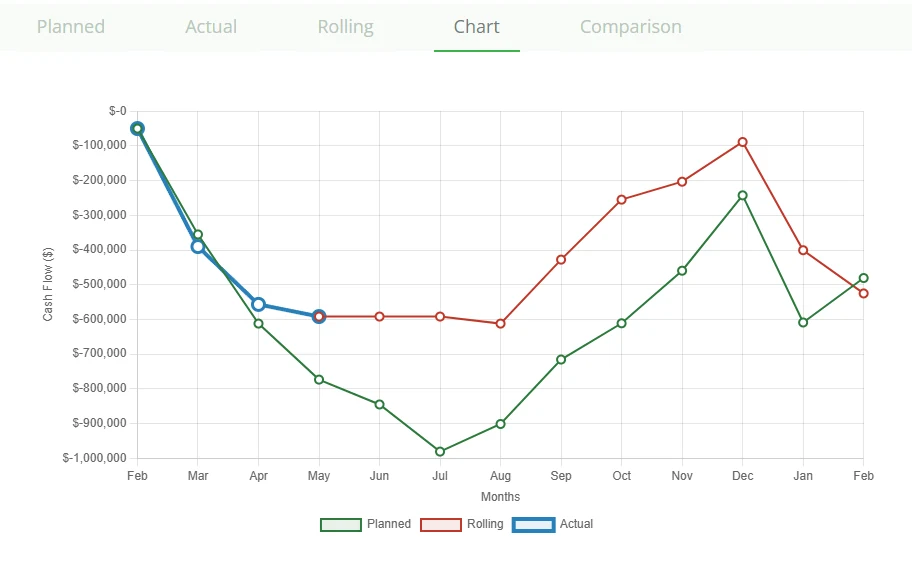
P2PAgri answers that with three views of the same cash flow: a planned budget for the year ahead, the actual figures as each month closes, and a rolling projection that blends the two. Build the plan once, keep the actuals current with a Xero import, and the rolling view tells you where the account is heading.
Plan Your Year, Month by Month
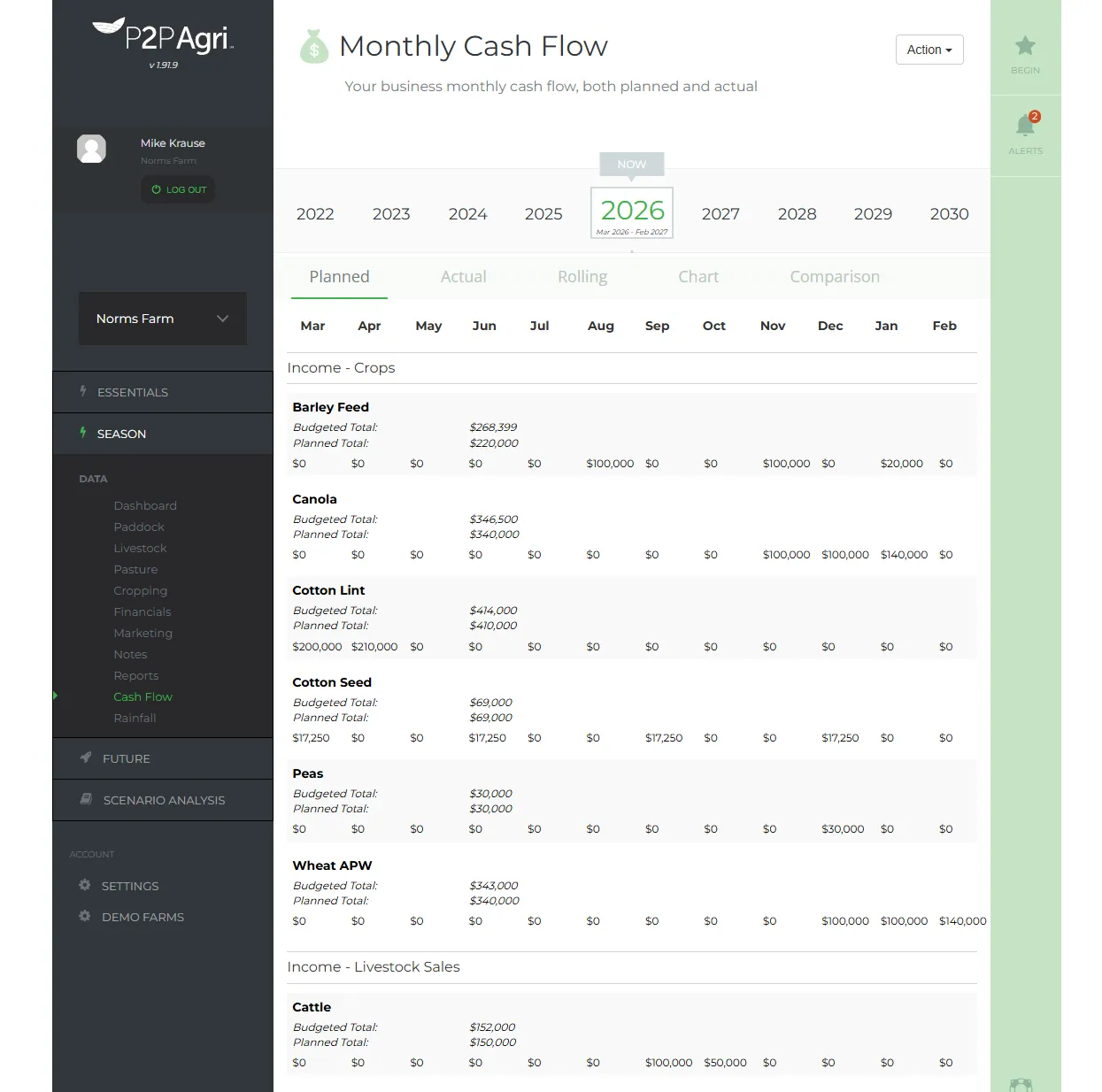
Start the season by entering your planned income and expenses for each month: crop and livestock sales, input costs, contractors, loan repayments, living expenses, and everything else that moves through the farm account. Your crop and livestock enterprises from the SEASON screens are already listed, so the income lines match the year you are actually planning.
Planned figures can be copied forward from last season and adjusted, rather than typed again from scratch, and a sticky totals bar keeps each month's position in view as you scroll.
Let Xero Build Your Cash Flow
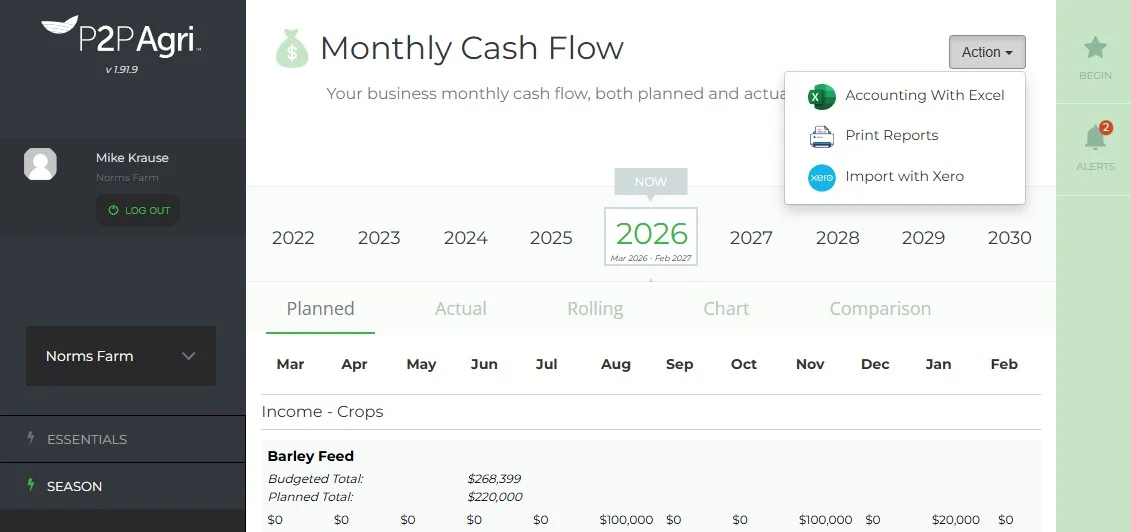
This is the big change for Xero users. Connect Xero once, then each month run the import from the cash flow Action menu. Every Xero account is matched to a line in your cash flow and the month's figures are entered for you.
Until recently the import could only fill in lines you had already created. A new account in Xero meant leaving the screen, adding the item by hand and importing again. Now the import creates the missing items itself. It suggests the right section of your cash flow from the account's type in Xero, reuses an item that already exists under the same name rather than duplicating it, and enters the figures in the same save. Next month's import recognises the items it created. Crop and livestock sales stay with your season plan, and the import says so rather than creating a second income line.
Before you save, the screen tells you exactly what will happen: how many items will be created, how many updated, and how many Xero accounts are still unmatched. The Xero totals show how much of each total you have matched so far, and the matching lists are searchable, so a chart of accounts that runs past a hundred items is no longer a scrolling exercise.
- Missing cash flow items created during the import, in the right section
- A plain summary of what Save will do before you commit
- Searchable account matching, with income and expense sections kept intact
- Read-only access to Xero: P2PAgri never writes to your books
Track Actuals as the Year Unfolds
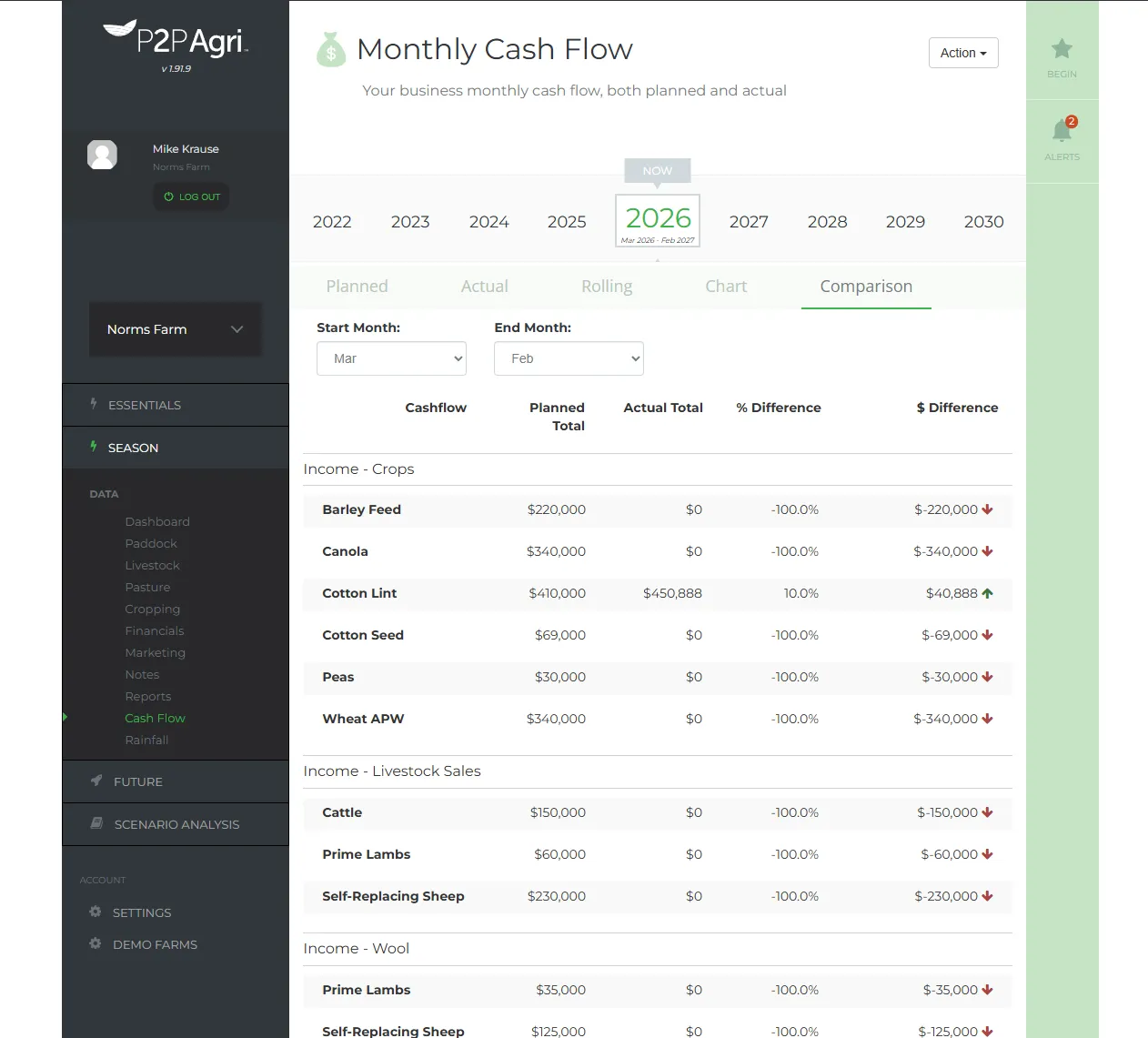
As each month closes, your actual figures sit alongside the planned ones and P2PAgri shows the variance month by month, so you see straight away when the season is tracking differently from plan.
Not on Xero? Export your Profit and Loss and Balance Sheet to Excel from MYOB, Agrimaster, Phoenix or a spreadsheet and upload those, or enter the figures directly. Either way you are not starting from a blank page.
- Planned cash flow: Your budget for the year ahead
- Actual cash flow: What really happened, entered as you go or imported from Xero
- Comparison view: Planned and actual side by side, with variances highlighted
Rolling Cash Flow Projections
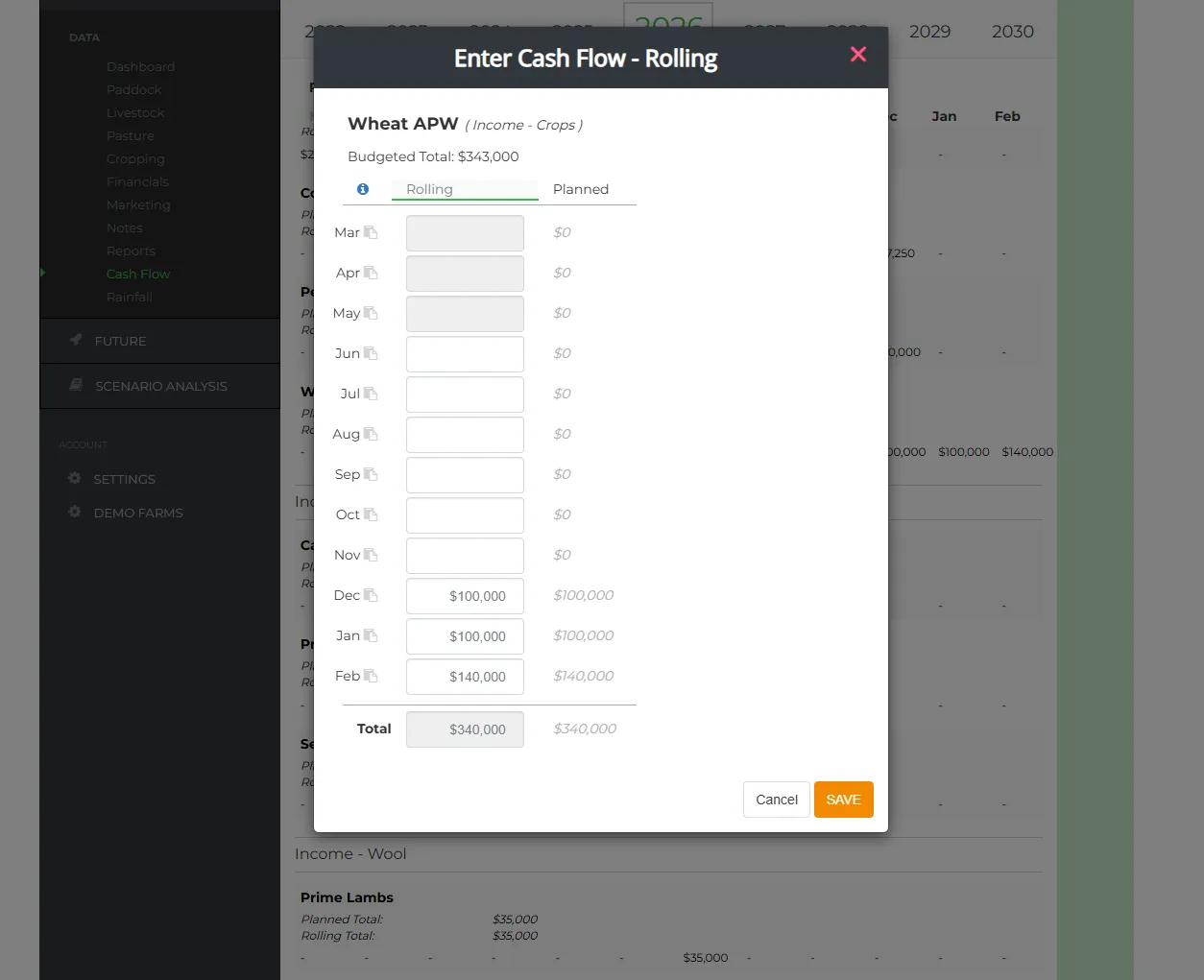
This is where P2PAgri really shines. Your rolling cash flow blends your actual figures for months that have passed with your planned figures for the months ahead. As each month ticks over, the projection updates automatically.
The result? A realistic, always-current view of where your cash position is heading. No more outdated budgets that stopped reflecting reality in March.
Switch the comparison between planned versus actual and planned versus rolling to see how far the year has drifted from the original budget, and copy the planned figures into the rolling view whenever you want a fresh starting point.
Last Season's Grain and Stock, Sold This Season
Produce grown in one season is often sold in the next. Grain in the silo and stock on hand at rollover can be sold months into the new year, and a cash flow that only lists this season's enterprises has nowhere to put that money.
P2PAgri now carries last season's crop and livestock categories into the new season's income list, marked "carried over". Enter the sale in the months the money actually lands and the season's picture is complete. Anything you are already running this season is left exactly as you set it up, budgets included.
GST Handling
Good farm budgeting is done GST exclusive, and P2PAgri handles both GST inclusive and exclusive figures with ease. Import from Xero either way and view the cash flow the way you prefer.
Once your monthly cash flow is set, the GST estimate calculator works out the GST impact at the click of a button, in whichever view you are working, so you can see the effect on the account before the BAS falls due.
Overdraft and Line-of-Credit Interest, Scheduled Properly
Overdraft interest rarely goes out monthly in the real world, so why should your budget pretend it does? Tell P2PAgri how often your overdraft and line-of-credit interest is actually paid (monthly, quarterly, 6-monthly or annually) and which month payments start, and the built-in interest payment schedule calculator does the rest.
Interest accrues in arrears and lands in the right payment months, so your cash flow shows the real timing of your finance costs, and your peak debt figure is one your banker will recognise.
Cash Flow Reports
Generate professional cash flow reports ready for your bank, adviser, or accountant:
- Cash flow comparison PDF: Planned vs actual or planned vs rolling, for the months you choose
- Rolling cash flow PDF: Current projection with actuals and forecasts
- Cash flow chart: Hide the series you don't need on screen and the printed chart matches
- Excel/CSV export: Take your data into a spreadsheet if you need to
- Monthly notes: Add context to any month's figures for your records
Learn It on the Screen Itself
The cash flow has its own guided walkthrough that steps you through the real screen, including a live Xero import and back, so the first month is not a guessing game. Contextual help sits beside the fields that need explaining. And on a phone the monthly ledger restacks into collapsible cards, so you can check a month from the ute without pinching and zooming.
How Cash Flow Fits Into the Bigger Picture
Cash flow planning in P2PAgri doesn't sit in isolation. Income lines come from your crop gross margins and livestock enterprises. In FUTURE planning, the closing balance of one planned year becomes the opening balance of the next, so a change in this year flows through every year after it. Scenario analysis lets you test a decision against the cash flow before you make it, and the dashboard shows the result alongside your other key numbers.
Get Started
Cash flow planning is available on the Seasonal plan ($89/month or $979/year inc. GST). Start with the free Essentials plan and upgrade when you're ready.
FAQ
Frequently Asked Questions
Yes. Connect Xero directly, or export your Profit and Loss and Balance Sheet to Excel from MYOB, Agrimaster, Phoenix or a spreadsheet and upload those. P2PAgri detects the format and maps your data into the right categories.
Once Xero is connected, one click from the cash flow Action menu imports the month's figures against your cash flow lines. If Xero has an account your cash flow doesn't, the import offers to create it in the right section and enters the figures in the same save, so you never have to leave the screen and start again.
Nothing to set up by hand. The next import lists the new account, suggests the cash flow section based on its type in Xero, and creates the item when you save. Later imports recognise it automatically, and an item that already exists under the same name is reused rather than duplicated.
No. The connection is read-only. P2PAgri pulls figures from Xero and never creates, edits or deletes anything in your books, so your accountant's tax work is untouched.
In the new season's cash flow. P2PAgri carries last season's crop and livestock categories into this season's income list, marked "carried over", so you can enter the sale in the months the money actually arrives. Your current season's enterprises and budgets are left as they are.
Absolutely. You can generate a professional PDF report to send to your bank, or invite your adviser to access your P2PAgri data directly so they can see your cash flow in real time.
Yes. Import your Xero figures GST inclusive or GST exclusive and view the cash flow either way. Good farm management accounting works GST exclusive so cost of production and KPI ratios stay clean, and the GST estimate calculator shows the GST effect on your cash position with a single click, which helps with BAS planning.
Yes. The interest payment schedule calculator lets you set how often overdraft and line-of-credit interest is paid and which month payments start. Interest accrues in arrears and appears in the correct payment months in your cash flow, matching how your bank actually charges it.
Related Reading
Articles You Might Find Useful
How to Build a Farm Cash Flow Forecast
Seven steps, Australian seasonal timing, and the BAS and FMD lines imported templates leave out
What Banks Really Look For When Lending to Farmers
The three things every lender weighs up, and where a well-prepared cash flow moves your rate
2026 Farm Business Planning
Managing cash flow under cost pressure in 2026
Explore More
Key Capabilities for Your Farm Business
Import Your Farm Accounting Data from Any Software
Xero Integration
If your farm bookkeeping runs through Xero, P2PAgri connects directly to it. Your accounting data flows into P2PAgri's f...
Learn moreFarm Financial Planning & Cash Flow
Financial Reports & Bank Ratios
Whether your bank asks for financials, your adviser needs a summary, or you just want to see how the year stacked up, P2...
Learn moreTest Your Farm Business Decisions
Scenario Analysis & What-If Planning
Every major farm decision involves uncertainty. Should you buy that extra land? What happens if wheat drops to $280/t? C...
Learn moreFarm Financial Planning & Cash Flow
Farm Business Dashboard
One screen that shows you how your farm business is tracking. P2PAgri's dashboard is your command centre, key metrics, v...
Learn more