
Features
Cattle Trading and Feedlot Calculator: Know What You Can Pay Before You Bid
The cattle trading and feedlot calculator is part of P2PAgri, on the Cattle Trading and Cattle Feedlot tabs in SEASON > Livestock. It is not a standalone free tool. It starts from your own costs, so the margin per head is yours and not a rule of thumb, and it works on your phone at the saleyard, with or without signal.
What Is the Most I Can Pay for a Pen of Cattle?
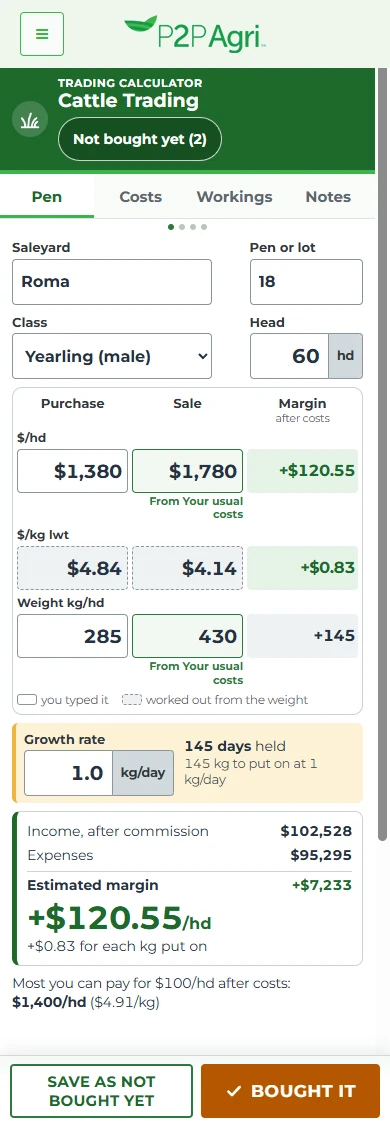
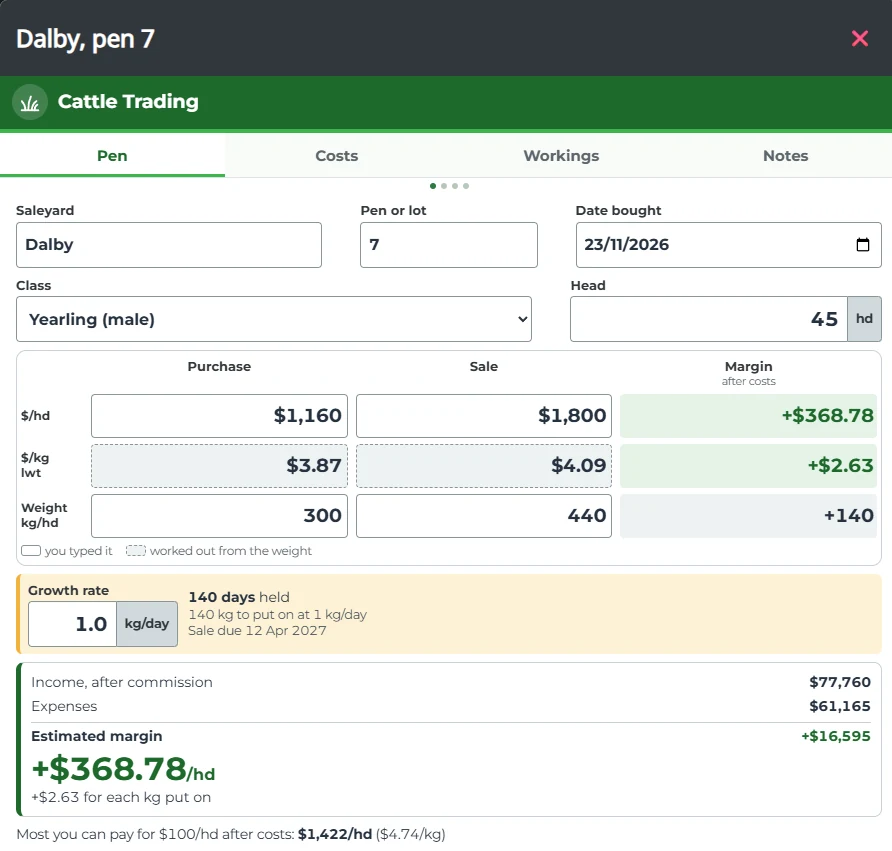
Type the head, the purchase price and weight, and the sale price and weight you expect. The calculator works out the days held from the two weights and your growth rate, then shows the estimated margin per head and for the whole pen, after costs.
Fill in Margin you want in Your usual costs and the calculator also shows the most you can pay for the pen, per head and per kilo, and still make that margin. You can type a price per head or per kilo liveweight, and the other is worked out from the weight.
In this example, 60 yearlings bought at 285 kg for $1,380 a head, with a sale expected at 430 kg for $1,780, show a margin of $120.55 a head after costs, or $7,233 for the pen, over 145 days. With $100 a head as the margin wanted, the most to pay is $1,400 a head.
The calculator is for lots of cattle you buy in to trade or feed. It works on the pen as a whole, so it does not record individual animal weights and it does not replace your National Livestock Identification System (NLIS) tag and movement records. Breeding herds keep the class by class layout.
What Costs Go Into a Cattle Trading Margin?
A quick sum at the rail usually covers the buy price and the sale price. The costs in between are the ones people leave out when they work it out in their head. The calculator counts them for every pen:
- Per head costs, such as levy, freight in, freight out, labour and health
- Agistment per head per day, on Cattle Trading, charged for the days the pen is held
- Feed: supplementary feed on Cattle Trading, and on Cattle Feedlot a ration worked out from each pen's head, weights and days
- Stock loss
- Interest
- Selling commission
You set these up once at the desk, under Variable Costs, Commission and Your usual costs, and every pen starts from them. If one lot is different, change a cost on that pen's Costs tab and it applies to that pen only. The Workings tab shows how the margin is made up.
Does the Calculator Work at the Saleyard With No Signal?
Yes. Before you go, sign in on the phone you will take and open SEASON > Livestock, or open the calculator, while you have a signal. That saves your figures on the phone, and after that the calculator works at the yards with no signal.
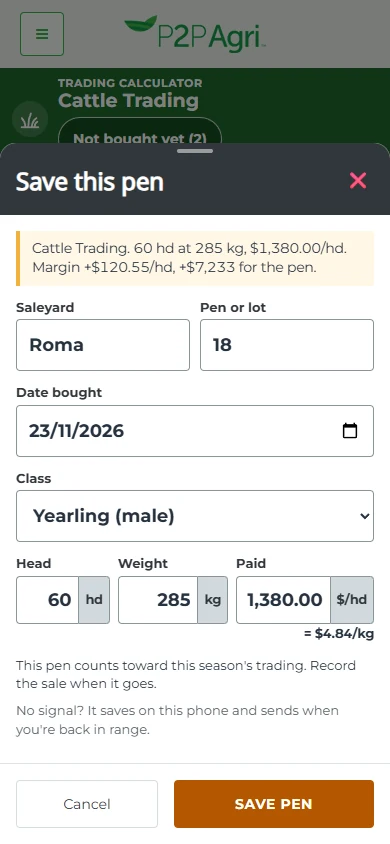
Type the Saleyard and the Pen or lot at the top, so you know which lot the figures are for. Tap Save as not bought yet or Bought it, check the details on the sheet that opens, and save. A pen saved with no signal is kept on the phone and sent when you are back in range. The Saleyard stays filled in for your next pen at the same yards, and you can type over it.
On a phone, the Cattle Trading and Cattle Feedlot tabs have an Open Pen Calculator button. You do need a signal to change Your usual costs or to record a sale.
Plan Pens First, Then Mark Them Bought
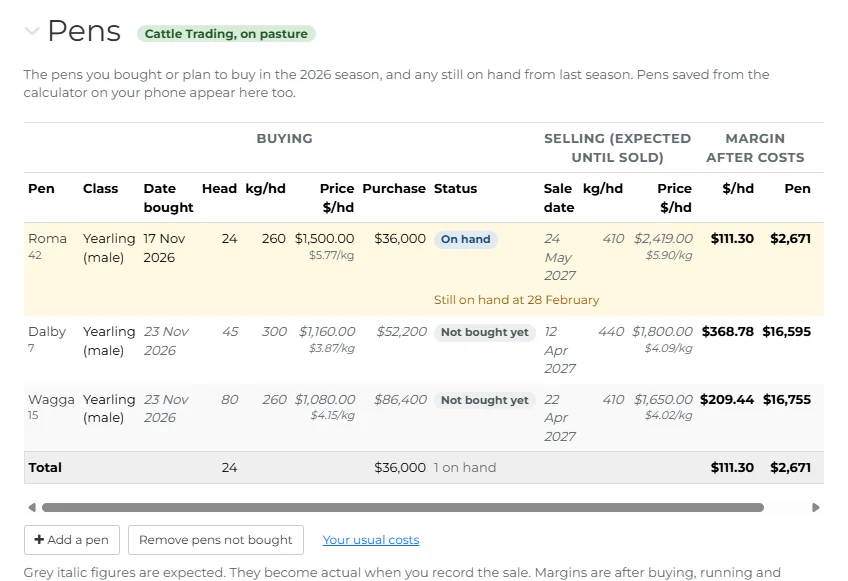
You do not have to wait for sale day. Click Add a pen, fill it in and click Save as not bought yet, and it sits in your Pens table as a pen you plan to buy. It counts as your plan, with the sale you expect, and is left out of the table's Total row until it is bought.
When you buy it, open the pen, check the figures and click Bought it. From then on you record what happens on the pen's Sales tab: the date sold, head sold, head died, weight and price. A pen that sells in more than one lot gets a sale for each. Grey italic figures are expected, and they become actual when you record the sale.
Each pen also has a Notes tab for anything you want to keep with it.
Where Each Pen Ends Up: Gross Margin, Cash Flow and Feed
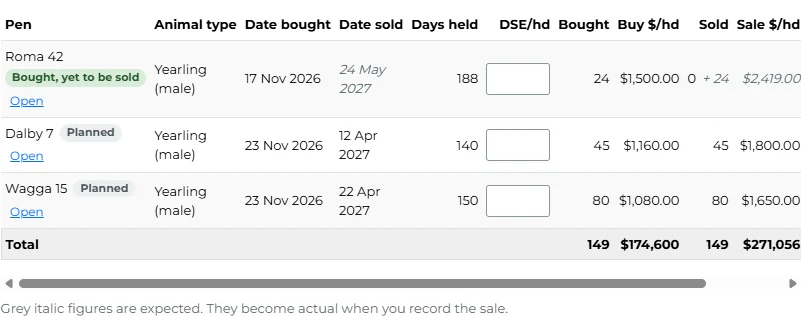
A saved pen is part of your livestock figures, not a sum on the side. On the Cattle Trading and Cattle Feedlot tabs the Reconciliation has one row per pen, showing when it was bought and sold, the days held, and the head and price each way.
A pen counts in the year that holds most of its days, from the date bought to the date sold. So a pen bought late in one season and held mostly in the next counts in the next season, and the Pens table names the season to look in.
The Livestock Gross Margin lists each pen by name with its sales income, and the cash flow shows the purchase and the sales in the months they happen. On Cattle Feedlot the feed bill is worked out from the pens. On Cattle Trading each pen has its own DSE per head, which Feed Demand uses.
See how cash flow planning works
Print a Page per Pen
Open Action > Print Pens for Cattle Trading or Cattle Feedlot, then choose Open Web View or Download PDF. The report starts with a summary table of the pens you have bought and their totals. Each bought pen then has a page of its own with its figures, costs, sales, workings and notes. Pens not bought yet are left out.
It is a useful thing to hand to your adviser or the bank when they ask how the trading cattle went.
Get Started
The cattle trading and feedlot calculator is part of the livestock screens on the Season plan ($89 a month or $979 a year), and the Future plan includes everything in Season. Start with the free Essentials plan and upgrade when you're ready.
FAQ
Frequently Asked Questions
Put the pen into the calculator with the head, the weights and the sale price you expect. It shows the margin per head after costs for the purchase price you type, so you can see straight away whether that price leaves you in front. If you fill in Margin you want in Your usual costs, it also shows the most you can pay per head and per kilo and still make that margin.
More than the buy and sale price. P2PAgri counts your per head costs such as levy, freight in and out, labour and health, plus feed, stock loss, interest and selling commission. On Cattle Trading it also charges agistment per head per day for the days the pen is held. You can change a cost for one pen on its Costs tab.
Yes. Cattle Trading is for cattle on pasture and Cattle Feedlot is for cattle in yards, and each has its own calculator. On Cattle Feedlot you can type prices in cents a kilo liveweight, and each pen gets a ration and a feed cost from its own head, weights and days.
Yes, once the phone has opened SEASON > Livestock or the calculator with a signal, for the person who was signed in. A pen you save with no signal is kept on the phone and sends by itself when you open P2PAgri back in range. You need a signal to change Your usual costs and to record a sale.
It is not a free standalone tool. It is part of P2PAgri's livestock screens, which are on the Season plan ($89 a month or $979 a year), and the Future plan includes everything in Season. The free Essentials plan does not include the farm management tools. See Pricing for the current plans.
They stay as they are until you choose Move to pens. The move is one year at a time and other years are not changed. Moving clears the stock numbers typed for that enterprise in that year, keeps your costs and commission rates, and cannot be undone, so note your figures down first if you want to enter them again as pens.
Explore More
Key Capabilities for Your Farm Business
Improve Profitability for Livestock & Pasture
Livestock Management
Whether you run cattle, sheep, a feedlot, or a mixed enterprise, P2PAgri tracks the numbers that matter: head counts, gr...
Learn moreUse P2PAgri Anywhere
Mobile Farm Management
Farm decisions don't wait until you're back at the office. P2PAgri works properly on your phone and tablet, so you can c...
Learn moreFarm Financial Planning & Cash Flow
Cash Flow Planning
Cash flow is the lifeblood of every farm business. A bumper harvest means nothing if you can't meet your repayments in J...
Learn moreImprove Profitability for Livestock & Pasture
Pasture Management
Are you running at the right stocking rate? Too many stock and you degrade your pastures. Too few and you're leaving mon...
Learn moreFarm Financial Planning & Cash Flow
Financial Reports & Bank Ratios
Whether your bank asks for financials, your adviser needs a summary, or you just want to see how the year stacked up, P2...
Learn more